Goal
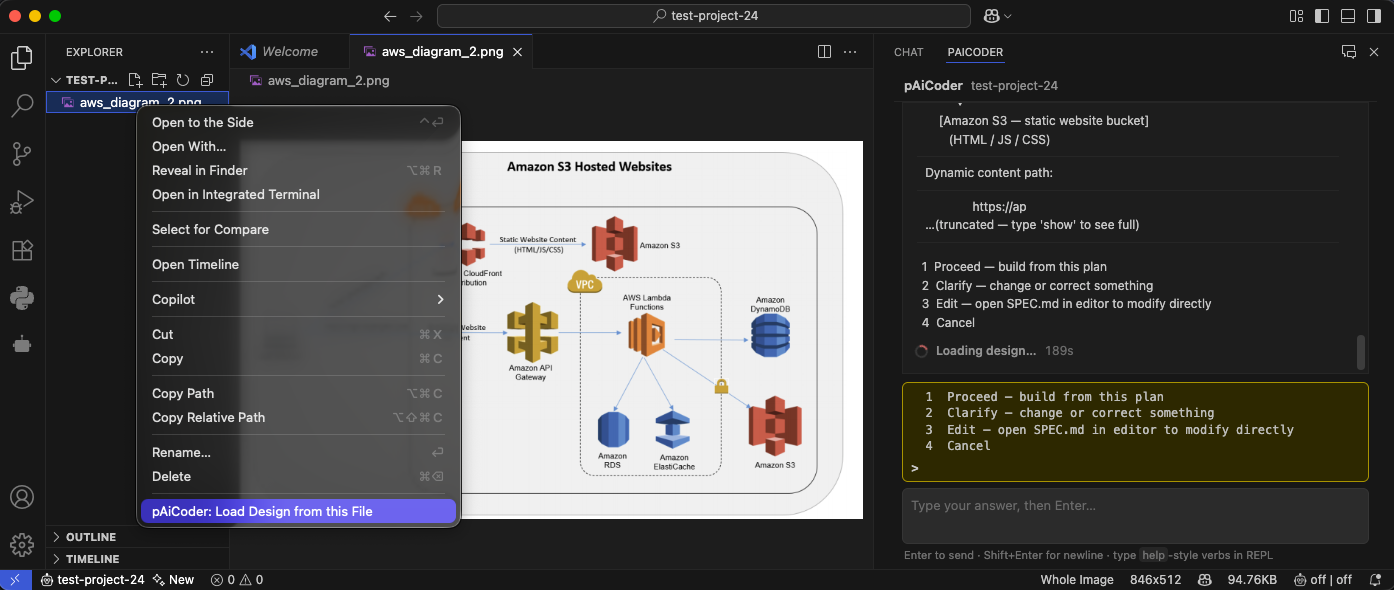
Provide a web application in which users access static HTML, JavaScript, and CSS content through an Amazon CloudFront distribution backed by Amazon S3, while dynamic application requests are sent to Amazon API Gateway. API Gateway invokes AWS Lambda functions running inside an Amazon VPC. The Lambda functions access Amazon DynamoDB, Amazon RDS, Amazon ElastiCache, and a separate Amazon S3 bucket to implement dynamic application behavior and persistence.
Architecture
A web browser is the external entry point. Requests for the static website, represented by www.example.com, are sent to an Amazon CloudFront distribution. CloudFront retrieves static HTML, JavaScript, and CSS objects from an Amazon S3 bucket and returns them to the browser. The S3 static-content bucket is an origin for CloudFront rather than a directly exposed application endpoint.
Dynamic requests, represented by https://api.example.com, are sent to Amazon API Gateway. API Gateway exposes the application API and invokes AWS Lambda functions for the API operations. API Gateway is the public boundary for dynamic content; the Lambda functions are not directly internet-facing.
The Lambda functions are configured for VPC access. They run using Lambda-managed elastic network interfaces in private subnets and can connect to Amazon RDS and Amazon ElastiCache through VPC security groups. Amazon RDS provides relational persistence, while ElastiCache provides low-latency cache access. Lambda also reads from and writes to Amazon DynamoDB for NoSQL application data.
The Lambda functions additionally access a second Amazon S3 bucket for application data. The diagram shows a lock on this bucket, so this specification treats it as a private bucket with public access blocked and server-side encryption enabled. Access is granted through the Lambda execution role rather than public bucket permissions.
The architecture contains one VPC boundary around the Lambda, RDS, and ElastiCache components. The diagram does not show internet gateways, NAT gateways, VPC endpoints, route tables, subnet counts, or security-group rules. Those details must be supplied by the generated CloudFormation template according to the assumptions documented below.
Architecture Diagram
                                   AWS Cloud
┌─────────────────────────────────────────────────────────────────────────────┐
│                                                                             │
│  Static website path                                                        │
│                                                                             │
│  [Web Browser] ── HTTPS: www.example.com ──► [Amazon CloudFront]            │
│                                                   │                         │
│                                                   │ S3 origin               │
│                                                   ▼                         │
│                                      [Amazon S3 Static Website Bucket]      │
│                                      HTML / JavaScript / CSS                │
│                                                                             │
│                                                                             │
│  Dynamic API path                                                           │
│                                                                             │
│  [Web Browser] ── HTTPS: api.example.com ──► [Amazon API Gateway]           │
│                                                   │                         │
│                                                   │ Lambda invocation       │
│                                                   ▼                         │
│                         ┌─────────────────────────────────────────┐         │
│                         │                 [Amazon VPC]            │         │
│                         │                                         │         │
│                         │  [AWS Lambda Functions]                 │         │
│                         │       │             │             │     │         │
│                         │       │             │             │     │         │
│                         │       │             │             │     │         │
│                         │       ▼             ▼             ▼     │         │
│                         │ [Amazon RDS] [Amazon ElastiCache]       │         │
│                         │                                         │         │
│                         └───────┼─────────────┼───────────────────┘         │
│                                 │             │                             │
│                                 │             └── VPC network connection    │
│                                 │                                           │
│                                 └── VPC network connection                  │
│                                                                             │
│  AWS service integrations from Lambda                                       │
│                                                                             │
│  [AWS Lambda Functions] ── AWS SDK/API ──► [Amazon DynamoDB]                │
│  [AWS Lambda Functions] ── AWS SDK/API ──► [Amazon S3 Private App Bucket]   │
│                                                🔒 private/encrypted         │
│                                                                             │
└─────────────────────────────────────────────────────────────────────────────┘
AWS Components
- Amazon CloudFront — distributes the static website globally and uses Amazon S3 as its origin.
- Amazon S3 — stores static website content such as HTML, JavaScript, and CSS.
- Amazon API Gateway — exposes the public HTTPS API and invokes Lambda functions.
- AWS Lambda — executes dynamic API business logic and accesses the data services.
- Amazon VPC — provides the network boundary for Lambda, RDS, and ElastiCache.
- Amazon RDS — provides relational database persistence for Lambda.
- Amazon ElastiCache — provides an in-memory cache accessible from the VPC.
- Amazon DynamoDB — stores application data accessed by Lambda through AWS service APIs.
- Amazon S3 — stores private application data accessed by Lambda through its IAM execution role.
- AWS IAM — supplies Lambda execution roles, CloudFormation deployment permissions, and CloudFront/S3 access controls.
- Amazon CloudWatch Logs — receives Lambda and API Gateway operational logs.
Estimated Cost
Assumption: one AWS Region, approximately 100,000 API requests per month, 100,000 CloudFront requests per month, 1 GB of S3 storage, one small single-AZ RDS instance, and one small single-node ElastiCache deployment. Data transfer, database storage, backups, and request payload sizes can materially change the estimate.
| Component | Est. monthly cost | Notes |
|---|---|---|
| Amazon CloudFront | ~$0–$1 | Depends on data transfer and request volume; free tier may apply |
| Amazon S3 | <$1 | Storage and request charges; free tier may apply |
| Amazon API Gateway | ~$0.10 | Regional REST API pricing is approximately per million requests; API type affects cost |
| AWS Lambda | ~$0 | First 1M requests and 400,000 GB-seconds/month may be free tier eligible |
| Amazon DynamoDB | ~$0–$2 | On-demand request and storage charges; free tier may apply |
| Amazon RDS | ~$15–$30 | Small single-AZ database instance plus storage; engine and class affect cost |
| Amazon ElastiCache | ~$15–$30 | Small single-node cache; engine and node class affect cost |
| Amazon VPC | ~$0 | VPC, subnets, route tables, and security groups have no direct charge |
| NAT Gateway | $0 in baseline | Not included in the baseline; adding NAT gateways creates hourly and data-processing charges |
| CloudWatch Logs | <$1 | Depends on log volume and retention |
| Rough total | ~$30–$65/month | Excludes substantial data transfer, backups, NAT gateways, and production scaling |
The AWS Pricing Calculator should be used for a precise estimate based on the selected Region, database engines, instance classes, traffic, storage, and data transfer.
IAM Permissions Required
The deployment identity running aws-deploy requires permissions to create and update the CloudFormation stack and all resources in the template. A deployment role should preferably be scoped to the target account, Region, stack resources, and named resource prefixes.
Required action set
cloudformation:*
lambda:CreateFunction
lambda:UpdateFunctionCode
lambda:UpdateFunctionConfiguration
lambda:DeleteFunction
lambda:PublishVersion
lambda:CreateAlias
lambda:UpdateAlias
lambda:DeleteAlias
lambda:AddPermission
lambda:RemovePermission
lambda:CreateEventSourceMapping
lambda:DeleteEventSourceMapping
apigateway:*
execute-api:*
iam:CreateRole
iam:DeleteRole
iam:GetRole
iam:PassRole
iam:AttachRolePolicy
iam:DetachRolePolicy
iam:PutRolePolicy
iam:DeleteRolePolicy
iam:CreatePolicy
iam:DeletePolicy
iam:GetPolicy
iam:CreateServiceLinkedRole
logs:CreateLogGroup
logs:DeleteLogGroup
logs:PutRetentionPolicy
logs:DeleteRetentionPolicy
logs:DescribeLogGroups
logs:TagResource
s3:CreateBucket
s3:DeleteBucket
s3:GetBucketLocation
s3:GetBucketPolicy
s3:PutBucketPolicy
s3:DeleteBucketPolicy
s3:PutBucketPublicAccessBlock
s3:GetBucketPublicAccessBlock
s3:PutBucketEncryption
s3:GetBucketEncryption
s3:PutBucketVersioning
s3:GetBucketVersioning
s3:PutObject
s3:GetObject
s3:DeleteObject
s3:ListBucket
cloudfront:CreateDistribution
cloudfront:UpdateDistribution
cloudfront:DeleteDistribution
cloudfront:GetDistribution
cloudfront:GetDistributionConfig
cloudfront:CreateOriginAccessControl
cloudfront:UpdateOriginAccessControl
cloudfront:DeleteOriginAccessControl
cloudfront:GetOriginAccessControl
cloudfront:TagResource
dynamodb:CreateTable
dynamodb:UpdateTable
dynamodb:DeleteTable
dynamodb:DescribeTable
dynamodb:TagResource
rds:CreateDBInstance
rds:ModifyDBInstance
rds:DeleteDBInstance
rds:DescribeDBInstances
rds:CreateDBSubnetGroup
rds:ModifyDBSubnetGroup
rds:DeleteDBSubnetGroup
rds:DescribeDBSubnetGroups
rds:AddTagsToResource
elasticache:CreateCacheCluster
elasticache:ModifyCacheCluster
elasticache:DeleteCacheCluster
elasticache:DescribeCacheClusters
elasticache:CreateCacheSubnetGroup
elasticache:ModifyCacheSubnetGroup
elasticache:DeleteCacheSubnetGroup
elasticache:DescribeCacheSubnetGroups
elasticache:AddTagsToResource
ec2:DescribeVpcs
ec2:DescribeSubnets
ec2:DescribeRouteTables
ec2:DescribeSecurityGroups
ec2:DescribeAvailabilityZones
ec2:CreateVpc
ec2:DeleteVpc
ec2:ModifyVpcAttribute
ec2:CreateSubnet
ec2:DeleteSubnet
ec2:CreateRouteTable
ec2:DeleteRouteTable
ec2:AssociateRouteTable
ec2:DisassociateRouteTable
ec2:CreateRoute
ec2:ReplaceRoute
ec2:DeleteRoute
ec2:CreateInternetGateway
ec2:AttachInternetGateway
ec2:DetachInternetGateway
ec2:DeleteInternetGateway
ec2:CreateSecurityGroup
ec2:DeleteSecurityGroup
ec2:AuthorizeSecurityGroupIngress
ec2:AuthorizeSecurityGroupEgress
ec2:RevokeSecurityGroupIngress
ec2:RevokeSecurityGroupEgress
ec2:CreateTags
ec2:DeleteTags
ec2:CreateNetworkInterface
ec2:DescribeNetworkInterfaces
ec2:DeleteNetworkInterface
ec2:AssignPrivateIpAddresses
ec2:UnassignPrivateIpAddresses
Lambda execution role
The Lambda execution role requires, at minimum:
logs:CreateLogGroup
logs:CreateLogStream
logs:PutLogEvents
dynamodb:GetItem
dynamodb:PutItem
dynamodb:UpdateItem
dynamodb:DeleteItem
dynamodb:Query
dynamodb:Scan
dynamodb:DescribeTable
s3:GetObject
s3:PutObject
s3:DeleteObject
s3:ListBucket
ec2:CreateNetworkInterface
ec2:DescribeNetworkInterfaces
ec2:DeleteNetworkInterface
ec2:AssignPrivateIpAddresses
ec2:UnassignPrivateIpAddresses
The Lambda role must not receive broad administrative permissions. RDS and ElastiCache access is through network connectivity and database credentials, not IAM data-plane permissions, unless a specific engine integration is later selected.
Pre-Deployment Checklist
- Configure AWS credentials using
aws configureorAWS_ACCESS_KEY_ID,AWS_SECRET_ACCESS_KEY, and, if applicable,AWS_SESSION_TOKEN. - Decide the AWS Region and set
AWS_REGIONinconfigs.py. - Decide the CloudFormation stack name and set
STACK_NAMEinconfigs.py. - Set the deployment environment, such as
dev,staging, orprod, inconfigs.py. - Open
.envand replace allYOUR_*_HEREvalues, including the database username, database password, and any application secret. - Decide the DNS names for the static website and API, such as
www.example.comandapi.example.com. - Ensure the selected AWS account has sufficient service quotas for VPC networking, Lambda VPC ENIs, RDS, ElastiCache, API Gateway, CloudFront, and S3.
- Decide the RDS database engine and ElastiCache engine before deployment, or accept the defaults documented in the Assumptions section.
- Provide the Lambda application source/package or accept the inline placeholder implementation described in the Assumptions section.
- If custom domains are required, request or import the required ACM certificates in the correct Region. CloudFront certificates must be in
us-east-1; API Gateway Regional certificates must be in the API Region. - If DNS is managed outside Route 53, obtain permission to create or update the required DNS records after deployment.
Implementation Phases
Phase 1: CloudFormation Infrastructure
Files: aws/cloud/stack.yaml, aws/cloud/parameters.json
What: Create the complete CloudFormation template for all resources in the Architecture section, including:
- Amazon VPC with public and private subnet resources as required by the selected networking assumption.
- Route tables, subnet associations, and security groups.
- Amazon S3 static-content bucket.
- Amazon S3 private application-data bucket with public access blocked and encryption enabled.
- CloudFront distribution with the static S3 bucket as its origin.
- CloudFront origin access control and the corresponding S3 bucket policy, if the private-origin assumption is retained.
- API Gateway REST API, resources, methods, deployment, stage, and Lambda integration.
- AWS Lambda function, VPC configuration, environment variables, execution role, and CloudWatch log group.
- Amazon DynamoDB table.
- Amazon RDS subnet group, security group, and database instance.
- Amazon ElastiCache subnet group, security group, and cache cluster.
- IAM roles and policies required by Lambda and CloudFront/S3 access.
- CloudFormation Outputs for bucket names, CloudFront distribution ID/domain name, API Gateway endpoint, DynamoDB table name, RDS endpoint, and ElastiCache endpoint where available.
parameters.json must contain an entry for every Parameter declared in stack.yaml, with values consistent with configs.py and .env.
Phase 2: Operational Files
Files: aws/cloud/deploy.sh, aws/cloud/README.md, .env, configs.py
Depends on: Phase 1; references the actual stack Outputs and parameter names.
deploy.shloads configuration and secrets, validates required configuration values, uploads any required deployment artifacts, and runsaws cloudformation deploywith the generated parameter overrides..envlists every secret or sensitive value usingYOUR_*_HEREplaceholders until filled by the developer.configs.pysetsAWS_REGION,STACK_NAME, andENVIRONMENT, plus non-secret deployment configuration.README.mdexplains credential setup, configuration, secret handling, parameter mapping, deployment, outputs, DNS configuration, and teardown.- The operational files must use the exact parameter names and CloudFormation Outputs defined in Phase 1.
No acceptance criteria, test scripts, or runtime verification artifacts are included. The developer fills in .env and configs.py, then runs aws-deploy.
Deployment Files
amazon-s3-hosted-website/
  SPEC.md                     — this specification (source of truth)
  .env                        — database and application secrets (YOUR_*_HERE placeholders)
  configs.py                  — non-secret config (region, stack name, environment)
  aws/
    cloud/
      stack.yaml              — CloudFormation template
      parameters.json         — stack parameters
      deploy.sh               — local deployment script
      destroy.sh              — local teardown script (manual counterpart to aws-destroy)
      README.md               — deployment notes
Deployment Notes
- After deployment, use the CloudFormation Outputs to obtain the CloudFront distribution domain name and API Gateway endpoint.
- Create or update DNS records for the chosen static website and API hostnames. The exact record type depends on the DNS provider and whether custom CloudFront/API Gateway domains are implemented.
- Upload the static website files to the static-content S3 bucket unless the deployment script performs that upload.
- Upload application data to the private S3 bucket only through controlled deployment or application workflows.
- Database schema creation and seed data are not specified by the diagram. They must be performed separately if the application requires them.
- RDS and ElastiCache are stateful resources. The teardown script must use explicit deletion and snapshot behavior rather than relying on accidental defaults.
- Lambda functions in private subnets cannot reach public AWS service endpoints unless the VPC has NAT Gateway access or suitable VPC endpoints. The diagram does not show either option.
- CloudFront distribution creation and updates can take several minutes.
- A CloudFront certificate, if used, must be provisioned in
us-east-1. - The diagram does not show API authentication, authorization, throttling, custom domains, WAF, backups, alarms, or multi-Region deployment.
Unknowns
| Unknown | Impact on architecture | How to resolve |
|---|---|---|
| RDS database engine and version | Determines the CloudFormation engine, port, parameter group, connection format, and client library used by Lambda | Specify an engine/version or accept the PostgreSQL default in Assumptions |
| ElastiCache engine and version | Determines the cache resource type, port, client library, and authentication configuration | Specify Redis or Memcached and version, or accept the Redis default in Assumptions |
| Lambda runtime, handler, package, and source code | Determines whether the function can be deployed directly and which SDK/database clients are available | Provide the runtime/package details or accept the inline placeholder assumption |
| Static S3 bucket access model | Determines whether CloudFront uses an S3 website endpoint or private S3 REST origin with OAC | Confirm the model; this specification assumes a private S3 REST origin with CloudFront OAC |
| Application S3 bucket purpose and object layout | Determines object prefixes, lifecycle policies, and exact Lambda read/write permissions | Specify the data types and prefixes or accept bucket-wide access limited to the application bucket |
| API paths, HTTP methods, and payload schemas | Determines API Gateway resources, integrations, CORS, and Lambda routing | Provide the API contract or accept a catch-all proxy API |
| Authentication and authorization | Determines whether Cognito, JWT Lambda authorizer, IAM authorization, API keys, or a public API is required | Specify the security model; baseline deployment has no authorizer |
| DNS ownership and certificate requirements | Determines whether Route 53 records and ACM certificates are created | Provide the hosted zone ID and certificate ARNs, or manage DNS/certificates manually |
| Expected traffic, concurrency, and data volume | Affects Lambda concurrency, DynamoDB capacity, RDS sizing, cache sizing, and CloudFront behavior | Provide expected RPS, concurrent users, storage, and monthly transfer |
| VPC egress requirement | Determines whether NAT gateways or VPC endpoints are needed for Lambda to call AWS services or public endpoints | Confirm whether Lambda requires internet/AWS endpoint access |
| Availability and backup requirements | Determines Multi-AZ RDS, ElastiCache replication, backups, deletion protection, and retention | Specify development versus production durability requirements |
| Required VPC topology | Determines CIDR ranges, number of Availability Zones, subnet sizes, and route tables | Provide network CIDRs/AZ requirements or accept the defaults in Assumptions |
| Secrets storage model | Determines whether credentials are passed as CloudFormation parameters, stored in Secrets Manager, or injected through another system | Specify the secret-management requirement or accept .env-supplied deployment parameters |
Assumptions
| Assumption | Where it manifests | How to override |
|---|---|---|
| Single AWS Region deployment | configs.py: AWS_REGION and parameters.json | Change the Region consistently in configuration and deployment parameters |
| Two-AZ VPC with private application subnets | stack.yaml VPC, subnet, route-table, and security-group resources | Change the CIDRs, AZ count, or subnet layout in stack.yaml |
| No NAT Gateway in the baseline | stack.yaml contains no NAT Gateway unless required by the selected Lambda dependency model | Add NAT gateways and routes, or add VPC endpoints for required AWS services |
| Lambda functions run in private subnets | stack.yaml: AWS::Lambda::Function VpcConfig | Remove VpcConfig only if RDS and ElastiCache access is no longer required |
| RDS defaults to PostgreSQL, single-AZ, and non-production sizing | stack.yaml RDS resource parameters | Select another engine, enable Multi-AZ, and change instance/storage parameters |
| ElastiCache defaults to Redis, single node, and non-production sizing | stack.yaml ElastiCache resource parameters | Select Memcached or Redis replication and change node/group settings |
| DynamoDB uses on-demand billing | stack.yaml: BillingMode: PAY_PER_REQUEST | Change to PROVISIONED and add read/write capacity parameters |
| Static website content is stored in a private S3 bucket | stack.yaml S3 public-access-block settings and CloudFront origin access control | Use an S3 website endpoint only if public website hosting is explicitly required |
| CloudFront is the only intended public static-content entry point | S3 bucket policy permits the CloudFront distribution rather than anonymous reads | Add a public bucket policy and website configuration if direct S3 access is required |
| Application S3 bucket is private and encrypted | stack.yaml application bucket encryption, public-access-block, and Lambda IAM policy | Change the encryption or access policy only for a documented application requirement |
| API Gateway uses a catch-all proxy integration | stack.yaml API Gateway proxy resource and Lambda integration | Define explicit API resources and methods when the API contract is available |
| No authentication layer is included | No Cognito user pool or API Gateway authorizer resource in stack.yaml | Add an authorizer, IAM authorization, API key, or other access-control mechanism |
Database credentials are supplied during deployment through .env | .env, parameters.json, and Lambda/RDS parameter wiring | Store credentials in AWS Secrets Manager and grant Lambda secretsmanager:GetSecretValue |
| Lambda uses an inline placeholder handler unless application code is supplied | stack.yaml Lambda Code/handler configuration and deploy.sh artifact handling | Provide a packaged Lambda artifact and update the function's Code, runtime, and handler |
| CloudWatch log retention is explicitly configured | stack.yaml AWS::Logs::LogGroup resources | Change retention days or remove explicit retention only with an operational decision |
| Development-oriented deletion and backup defaults are used unless overridden | RDS, ElastiCache, S3, and CloudFormation resource policies in stack.yaml | Add deletion protection, snapshots, retention, and backup policies for production |
| No custom domain resources are created by the baseline stack | CloudFront and API Gateway use generated service endpoints | Add ACM certificates, API Gateway custom domains, CloudFront aliases, and DNS resources |
Notes
- The diagram labels the overall design “Amazon S3 Hosted Websites,” but it also shows CloudFront between the browser and S3. The implementation therefore treats CloudFront as the static website entry point and S3 as its origin.
- The diagram does not distinguish the static-content S3 bucket from the application-data S3 bucket. This specification defines two separate buckets to preserve the two different roles shown: public-facing static origin content and locked private application storage.
- The diagram shows Lambda inside a VPC and arrows to RDS and ElastiCache, but it does not show network routing or security-group rules. The generated template must permit only the required Lambda-to-RDS and Lambda-to-ElastiCache ports.
- DynamoDB and S3 service API calls from a VPC-attached Lambda require either NAT Gateway connectivity, appropriate VPC endpoints, or a Lambda networking design that supports the required endpoints. The baseline intentionally does not silently add NAT gateways because none are shown in the diagram.
- RDS and ElastiCache credentials, encryption-at-rest settings, backup retention, and high-availability behavior are not specified by the diagram and are controlled by the assumptions above.